CASE STUDY
Using AI to Accelerate Experience Design
I used AI tools to move faster from early insights to concepts, wireframes, and prototypes.
Project Overview
In complex product work, teams often need something concrete before they can align. AI helped me get to that first tangible version faster — then design judgment made it useful.
For this project, I explored how AI could support early experience design for a complex lending journey. The work involved moments where users needed clearer guidance around options, eligibility, application status, supporting documents, and next steps.
I did not use AI to replace the design process. I used it to create rough starting points faster, so the team had something to review, challenge, and improve.
PROBLEM
Early product ideas can stay abstract for too long.
Teams may agree on the opportunity, but still struggle to picture what the experience could actually look like. This can slow down feedback, alignment, and decision-making.
The challenge was to move from discussion to tangible concepts faster — without treating AI-generated work as final design.
GOAL
The goal was to use AI as a practical accelerator in the design process.
I wanted to:
Turn early insights into screen concepts faster
Create rough wireframes for discussion
Explore plain-language content options
Help stakeholders react to ideas more easily
Reduce the time between idea, prototype, and feedback
MY ROLE
I helped shape the experience direction and used Stitch and AI tools to support early concept development.
My role was to guide the inputs, evaluate the outputs, refine the experience, and make sure the work stayed grounded in user needs, business goals, accessibility, brand standards, and service design thinking.
Design Approach
1
Started with the journey
Before using AI, I focused on where users might feel confused, uncertain, or stuck. This helped keep the work grounded in real experience problems, not just generic screen ideas.
2
Focussed on the right moments
I narrowed the work to areas where clearer guidance could make the biggest difference — eligibility, application status, missing tasks, and next steps.
3
Used AI to get to the first draft
I used Stitch and AI tools to quickly explore wireframes, draft copy, layouts, and flow ideas. These were not final designs — they were starting points for discussion.
4
Refined the experience
From there, I shaped the structure, content, hierarchy, flow, accessibility, and tone. The real design work was deciding what to keep, what to change, and how to make the experience clearer.
5
Made the ideas easier to discuss
The refined concepts and prototypes gave the team something concrete to react to. Instead of talking in the abstract, we could review specific screens, messages, steps, and decisions — then use feedback to improve the direction.
The AI - Designer Collaboration
Application Tracker - Making next steps, status, and missing tasks easier to understand.
AI first draft
The first AI-generated version gave us a useful starting point. It quickly organized the main pieces of the experience, including progress steps, checklist items, status messages, and primary actions.
It helped us see the basic structure of the flow without spending too much time building everything from scratch.
Stitch AI
Mapped key data points into interface elements
Created an early progress tracker structure
Suggested basic status messages and alerts
In short: AI helped create the first draft quickly, but it still needed design judgment to make it clear, useful, and on-brand.
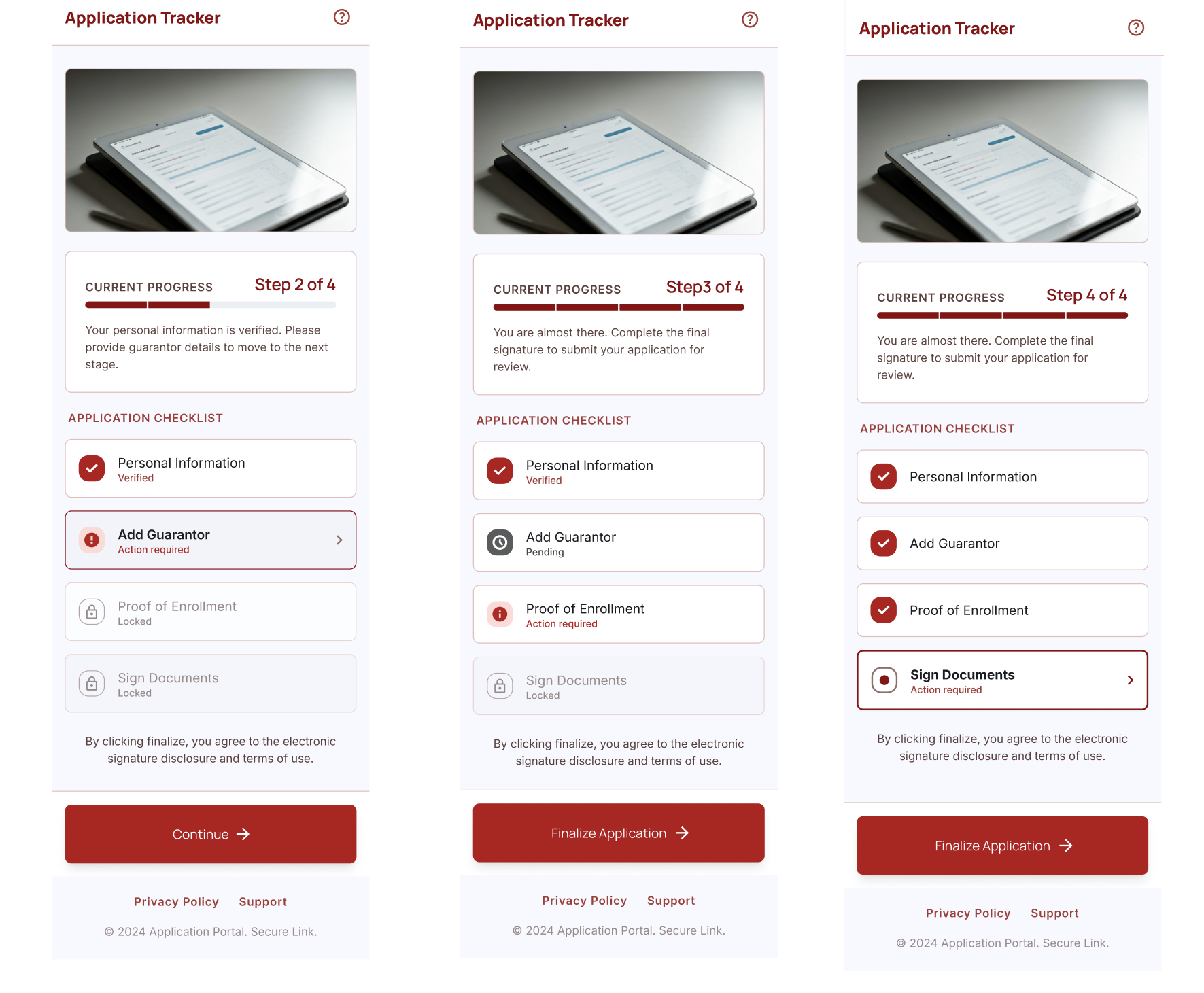
Refined by the designer
From there, I refined the concept so it felt more usable, supportive, and aligned to brand standards.
I improved the hierarchy, adjusted the spacing, simplified the copy, and made the interaction patterns feel more intentional. I also reviewed the experience for accessibility, tone, and clarity — especially because users may be making stressful financial decisions
Refinement focus:
Clarifying the steps, adding different status messages, and improving the overall flow across screens so users could better understand what was complete, what was still needed, and what to do next.
Improved spacing and layout consistency
Adjusted typography and visual hierarchy to better match brand standards
Refined microcopy to make next steps clearer and more reassuring
Added clearer status messages for different application states
Improved the screen-to-screen flow so the experience felt easier to follow
Checked that the experience felt accessible, supportive, and easy to use
What AI Helped With vs. What Still Needed Human Judgment
AI helped speed up
Drafting content:
Quickly turned complex requirements into clearer, plain-language copy.
Exploring options:
Created multiple layout ideas quickly so I could compare directions.
Testing flow logic:
Helped think through different user paths, edge cases, and conditional steps.
Human judgment was still needed
Tone and empathy:
Made sure the experience felt supportive, especially during stressful financial decisions.
Journey fit:
Connected separate screens and ideas into one clear, consistent experience.
Design refinement:
Refined the AI-generated concepts to improve hierarchy, usability, content clarity, and interaction patterns.
Brand alignment:
Adjusted the designs to better reflect brand standards, accessibility expectations, and established design system patterns.
Outcomes
The AI-assisted workflow helped move from prioritized ideas to tangible concepts faster. It gave the team early wireframes and draft content to review, critique, and refine, supporting faster stakeholder alignment and clearer prototype direction.
The biggest value was not speed alone. It was the ability to make complex service ideas visible earlier, so the team could discuss the experience, identify gaps, and improve the direction before investing in more detailed design.